How to check a provider's REPSE registration in Mexico, step by step
Mexico's Labor Ministry (STPS) publishes the REPSE registry of specialized-service providers at repse.stps.gob.mx. Click Consultar Padrón, search by the provider's folio, RFC or company name, and open its record: it shows the folio, the registration notice and date, the expiry date and the specialized services registered. No login or e.firma is needed to search. Check it before signing with any Mexican staffing provider or employer of record.

At a glance
- Who runs it
- The Labor Ministry (STPS), at repse.stps.gob.mx[1]
- Login to search
- None. Only providers applying for registration sign in with an e.firma[1]
- Search by
- Folio, RFC or company name[1]
- What a record shows
- Folio, registration notice and date, expiry date and the registered services[1]
- Renewal
- Every three years[2]
- Fine for using an unregistered provider
- 2,000 to 50,000 UMA, the same as for the provider[3]
Open the STPS REPSE portal
Go to repse.stps.gob.mx. The page opens by stating that, under articles 13 and 15 of the Federal Labor Law, providers of specialized services or works, and companies that provide complementary or shared services within a corporate group, must be registered with the STPS, and that the platform is where they apply for, renew and update that registration.[1]
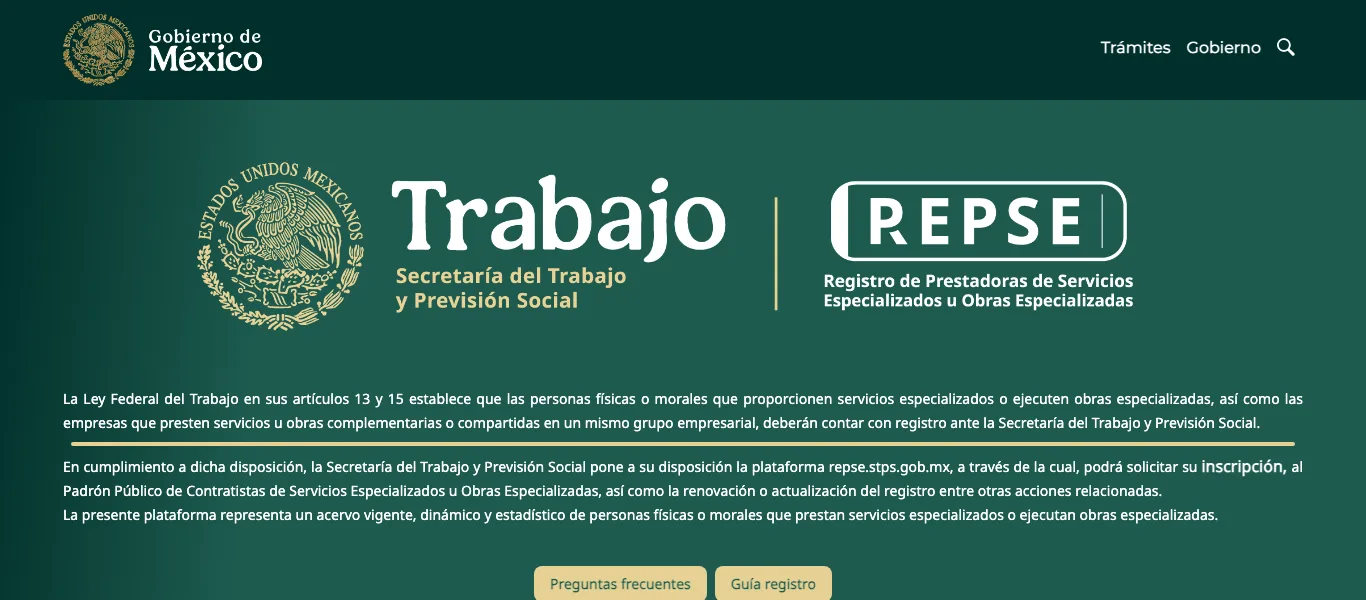
REPSE portal, captured by Nearshorers on November 2, 2026. Source: repse.stps.gob.mx.
- The legal basis: articles 13 and 15 of the Federal Labor Law.
- The platform for registration, renewal and updates.
- Preguntas frecuentes: who must register and what can be subcontracted.
Click Consultar Padrón, the public registry
Scroll down to the card titled Iniciar Sesión/Registrarse. Signing in there is only for providers and works exclusively with an e.firma, the key, certificate and password of the company that applies.[1] You do not need it: click Consultar Padrón to open the public registry.
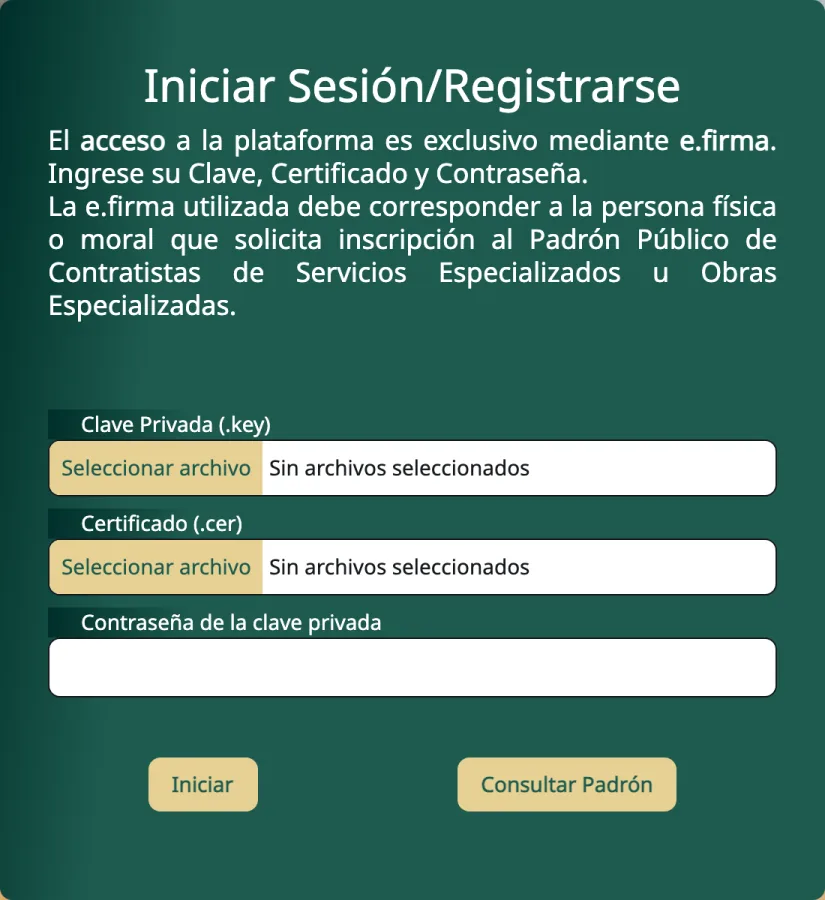
Sign-in card of the REPSE portal, captured on November 2, 2026. Source: repse.stps.gob.mx.
- Sign-in is for providers, with an e.firma only.
- Key, certificate and password: not needed to search.
- Consultar Padrón opens the public registry.
Search by folio, RFC or company name
The panel explains that you can search and download the public registry of contractors and review the list of contractors whose registration is cancelled.[1] Type in the Razón Social box: it searches by folio, RFC or company name and suggests registered names as you type. Searching by the company’s RFC avoids confusing two companies with similar names. Pick the match and click Buscar.
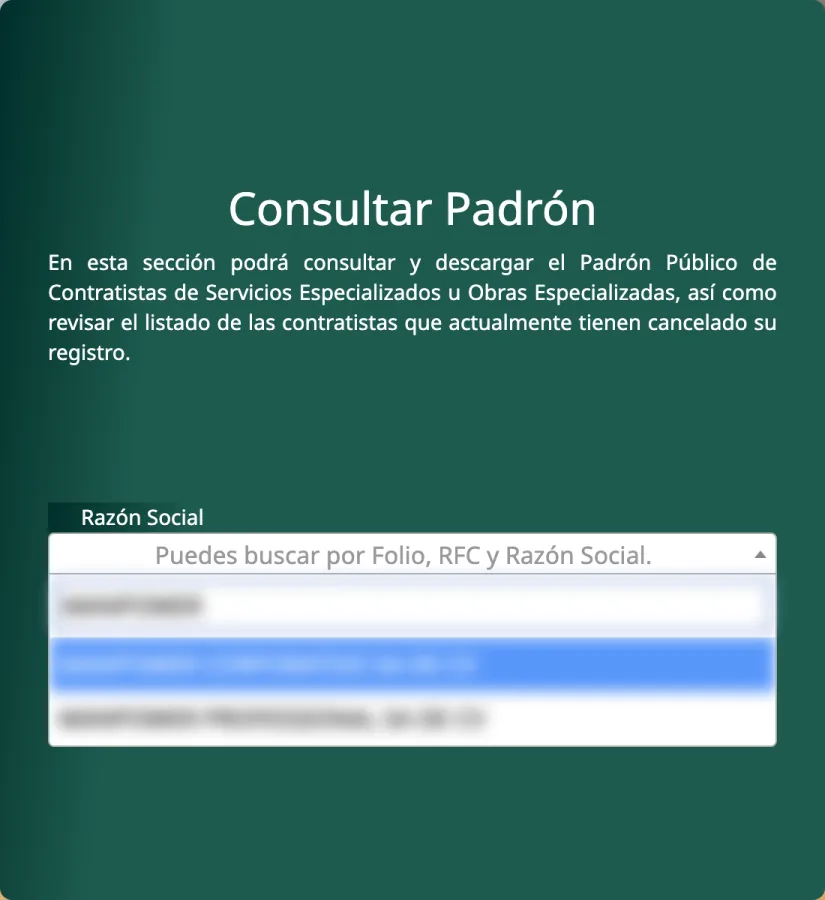
Search panel, captured on November 2, 2026; the search term and suggested company names are blurred by Nearshorers. Source: repse.stps.gob.mx.
- Search and download the registry, including cancelled registrations.
- Search by folio, RFC or company name.
- Registered names that match, as you type.
Read the record and compare it with your contract
The record opens in a window titled Padrón Público de Contratistas de Servicios Especializados u Obras Especializadas.[1] Check each field against the provider’s contract and invoices:
| Field on the record | What to check |
|---|---|
| Folio REPSE | The provider’s registration number; ask for it to be written into your contract |
| Nombre o Razón social | The same legal entity that signs your contract and issues the invoices |
| Entidad / Municipio | Where the provider is registered |
| Aviso de registro N. / Fecha de aviso de registro | The registration notice and its date |
| Vigencia del registro | In force on your start date, since registrations are renewed every three years[2] |
| Ofreciendo los siguientes servicios | Covers the service you are buying, which must be specialized and outside your own corporate purpose[2] |
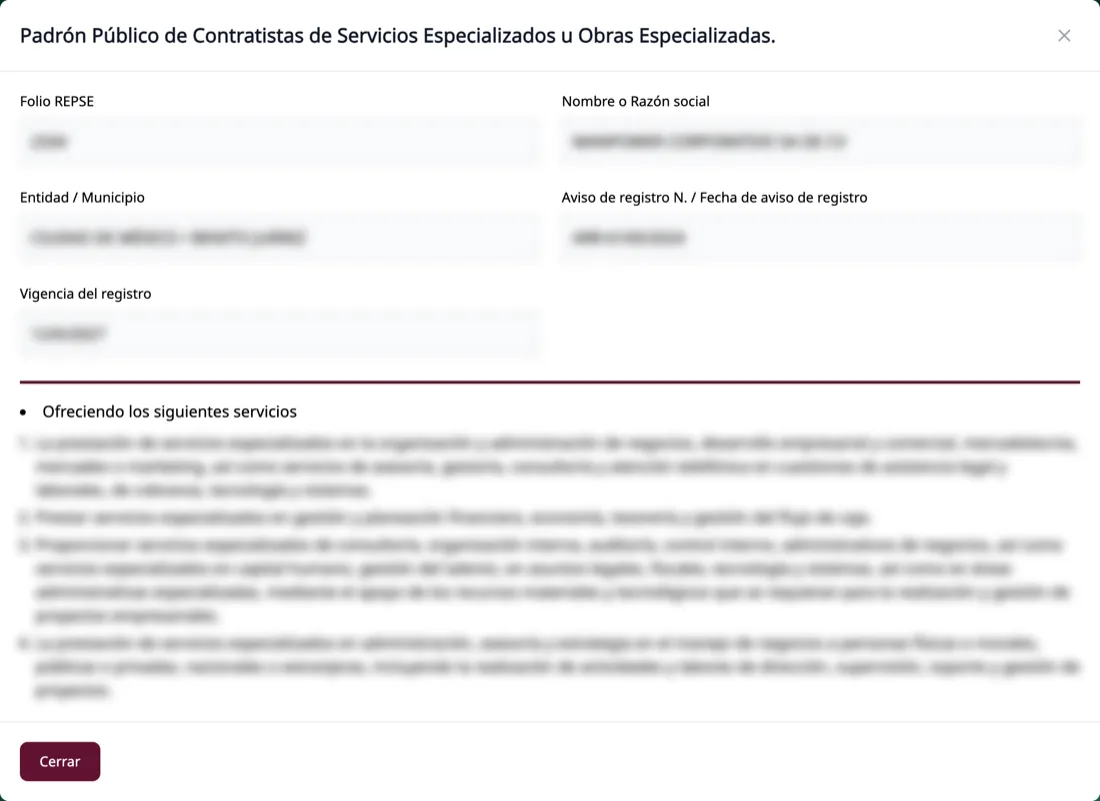
A registry record, captured on November 2, 2026; the company's data is blurred by Nearshorers. Source: repse.stps.gob.mx.
- Folio REPSE.
- Company name: must match your contract.
- State and municipality.
- Registration notice number and date.
- Expiry date of the registration.
- The specialized services registered.
Why check REPSE before you contract staff in Mexico?
Because the fine reaches you, not only the provider. Since April 2021, Mexico’s Federal Labor Law bans personnel subcontracting and allows subcontracting only for specialized services or works that are not part of the client’s corporate purpose or predominant economic activity, delivered by a provider registered with the STPS.[2] The contract must be in writing, and the client is jointly liable if the provider fails its obligations to the workers.[2]
Subcontracting personnel, or subcontracting without registration, is fined 2,000 to 50,000 UMA, and the same fine applies to whoever benefits from the services.[3] At the 2026 value of the UMA, MXN 117.31 a day, that is about MXN 234,620 to MXN 5.87 million.[4] The client is also jointly liable for the provider’s social security contributions, and registered providers must report their contracts to the IMSS every four months.[5]
Who has to be registered in REPSE?
The provider, not the client. The registry’s own guidance lists two groups: individuals or companies that put their own workers at the disposal of a third party, with the workers carrying out their activities at a workplace owned or run by the client on a permanent, indefinite or periodic basis; and companies that provide complementary or shared services within the same corporate group.[1] It also says what can be subcontracted: specialized services or works that are not part of the beneficiary’s corporate purpose or predominant economic activity and that require putting staff at its disposal.[1]
A US company that contracts a registered provider does not register itself; its job is to confirm that the provider is in the registry, that the registration is in force, and that the registered services match what the contract buys.
What if the provider is not registered, or its registration expired?
Do not sign, or ask for the registration before the start date. Registrations must be renewed every three years,[2] and the public registry also lists the providers whose registration has been cancelled.[1] Since June 2026, registration, renewal and cancellation run through a single STPS procedure, with an answer in five working days for providers with up to 10 workers and 15 working days for larger ones,[6] so a provider that is not yet registered can say when it will be.
Does a REPSE registration make an employer of record compliant?
Not on its own. Registration is a condition for legal subcontracting, but the law still requires the service to be specialized and outside the client’s corporate purpose,[2] and it does not specifically address a foreign client with no establishment in Mexico. Our guide to hiring in Mexico covers the hiring routes and what to ask an employer of record before you sign.
How do you hire in Latin America with Nearshorers?
Tell us the role on a 15-minute call and we turn it into a scorecard; most roles are filled in 7 to 14 days. Then choose one of our two hiring models. With Staffing, Nearshorers engages and pays the specialist, handles contracts, compliance and payments, and takes on the risk of the relationship, while you direct the work. With Headhunting, you hire them directly for a single placement fee, and the rules on this page apply to your company.
- 01/The briefA 15-minute call: the role, the metrics it should own and your budget, turned into a scorecard.
- 02/The shortlistWe search our Latin America network and vet for skill, English and ownership.
- 03/The interviewsYou interview the shortlist; we handle scheduling and feedback.
- 04/The onboardingHire through us with Staffing, where we take on the contract, payments and risk, or directly for a one-time fee.
Frequently asked questions
Is the REPSE registry public?
Yes. Anyone can search it at repse.stps.gob.mx through the Consultar Padrón button, by folio, RFC or company name, and the same section lets you download the registry and see the providers whose registration was cancelled. Only providers that apply for registration need to sign in, with an e.firma.
What does vigencia del registro mean on a REPSE record?
It is the date until which the provider's registration is valid. The Federal Labor Law requires specialized-service providers to renew their registration every three years, so check that the date is later than the start of your contract and put a reminder before it expires.
Can my company be fined for using a provider without REPSE registration?
Yes. The Federal Labor Law fines personnel subcontracting, or subcontracting without registration, with 2,000 to 50,000 UMA, and applies the same fine to the company that benefits from the services. The client is also jointly liable for the provider's labor and social security obligations.
Does a US company that hires through a Mexican provider need its own REPSE registration?
No. The registration obligation falls on the providers that put their own workers at the disposal of a third party, and on companies that provide complementary or shared services within their corporate group. The client's job is to check that its provider is registered, that the registration is in force and that it covers the service contracted.
How long does a REPSE registration take after the 2026 changes?
Since June 2026 the STPS handles registration, renewal and cancellation in a single procedure, with a response in five working days for providers with up to 10 workers and 15 working days for larger ones. If your provider is not yet registered, ask for the date of its application and the expected answer.
Sources
Every figure on this page links to the source below that states it. Rules are cited from the statute or the agency that applies it, and every source was checked on November 2, 2026. This page is general information to plan a hire, not legal or tax advice; laws change, so confirm your case with a local lawyer or accountant.
- REPSE - Registro de Prestadoras de Servicios Especializados u Obras Especializadas Government · Secretaría del Trabajo y Previsión Social (STPS) · checked November 2, 2026
- Ley Federal del Trabajo (texto vigente; última reforma publicada DOF 21-02-2025) Law · Secretaría de Gobernación - Orden Jurídico Nacional · 2025-02-21 · checked November 2, 2026
- Ley Federal del Trabajo, texto vigente, última reforma publicada DOF 14-05-2026 (compilation of the Cámara de Diputados, Secretaría de Servicios Parlamentarios; copy hosted by the Municipality of Calnali, Hidalgo) Law · Cámara de Diputados del H. Congreso de la Unión (copy hosted at calnali.gob.mx) · 2026-05-14 · checked November 2, 2026
- Unidad de Medida y Actualización (valores 2026) Official statistics · Diario Oficial de la Federación / Instituto Nacional de Estadística y Geografía (INEGI) · 2026-01-09 · checked November 2, 2026
- Ley del Seguro Social (texto vigente, última reforma publicada DOF 15-01-2026; Cámara de Diputados compilation hosted by IMSS) Law · Instituto Mexicano del Seguro Social (IMSS) · 2026-01-15 · checked November 2, 2026
- ACUERDO por el que se establecen acciones de simplificación para trámites que se realizan ante la Secretaría del Trabajo y Previsión Social Law · Diario Oficial de la Federación / Secretaría del Trabajo y Previsión Social · 2026-06-09 · checked November 2, 2026